
How to Distinguish and Use Announcements, Pinned Posts, and Popular Posts on Forums
Understanding the Roles of Announcements, Pinned Posts, and Popular Posts
A simple rule works in most communities:
| If you want to… | Read… |
|---|---|
| Learn the forum’s rules or how the community works | Pinned posts |
| Check whether something important recently changed | Announcements |
| Discover current discussions or common questions | Popular or Trending posts |
Knowing this difference saves time and helps you avoid asking questions that have already been answered.
Read the Right Post Type Based on Your Goal
Many new users immediately open whichever thread appears first, but a better approach is to identify your goal before reading.
If you have just joined a community, begin with the pinned posts. These are usually written specifically for new and returning members and often include forum rules, posting guidelines, frequently asked questions, resource collections, or links to important tutorials. Because moderators expect members to read them first, many questions that beginners ask have already been answered there.
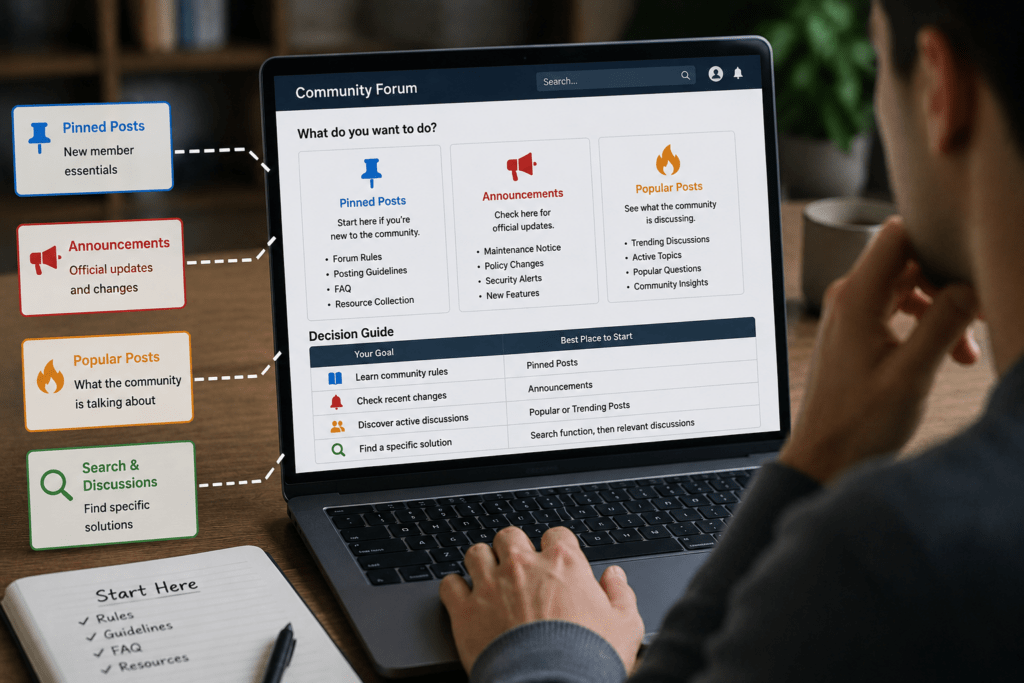
If your goal is to determine whether something has recently changed, announcements should be your priority. These are official communications from moderators or administrators and often cover scheduled maintenance, policy revisions, service interruptions, security notices, community events, or newly introduced features. Unlike pinned posts, announcements are frequently time-sensitive. A maintenance notice that is important today may be removed next month because it is no longer relevant.
Popular posts serve an entirely different purpose. They are not necessarily official or educational. Instead, they reflect what community members are actively reading, replying to, or reacting to. This makes them useful for discovering current discussions, learning about emerging problems, or seeing how experienced members approach common questions.
A simple decision process works well on almost every forum:
| Your goal | Best place to start |
|---|---|
| Learn community rules | Pinned posts |
| Check recent changes | Announcements |
| Discover active discussions | Popular or Trending posts |
| Find a specific solution | Search function, then relevant discussions |
Following this order often prevents duplicate questions and helps you understand how the community operates before participating.
Understand Why These Posts Exist and How Platforms Treat Them Differently
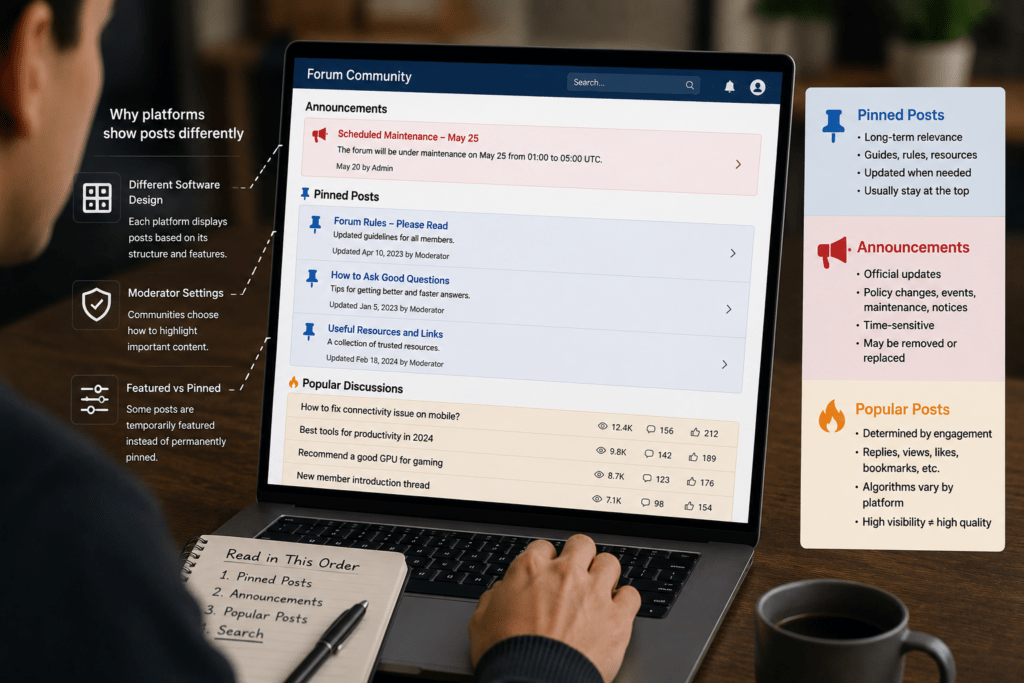
Although many forums use similar terminology, not every platform displays these posts in exactly the same way.
Some communities clearly separate announcements from sticky threads. Others combine them into a single area at the top of each category. On modern platforms, moderators may also feature certain discussions without permanently pinning them. As a result, the visual appearance of these posts varies depending on the software and the community’s moderation practices.
Pinned posts are generally designed to stay relevant over a long period. They may explain how to ask good questions, list trusted resources, organize recurring discussions, or collect useful reference material. Even if a pinned guide is several years old, it may still be accurate because moderators periodically update its contents rather than creating a new thread.
Announcements, however, usually exist because something has changed. Perhaps the forum is introducing a new moderation policy, changing account requirements, launching a new section, or temporarily shutting down certain services. Reading announcements first prevents confusion when older guides no longer match current policies.
Popular posts are determined differently. Some forums rank discussions primarily by reply count, while others consider views, reactions, upvotes, bookmarks, or recent activity. Many platforms use proprietary algorithms that combine several engagement signals. Because these formulas differ, a thread that appears highly visible on one platform might not receive the same exposure elsewhere.
This difference matters because visibility does not necessarily reflect quality. Understanding why a discussion appears at the top helps you judge whether it deserves your attention.
Don’t Assume Popular Means Correct
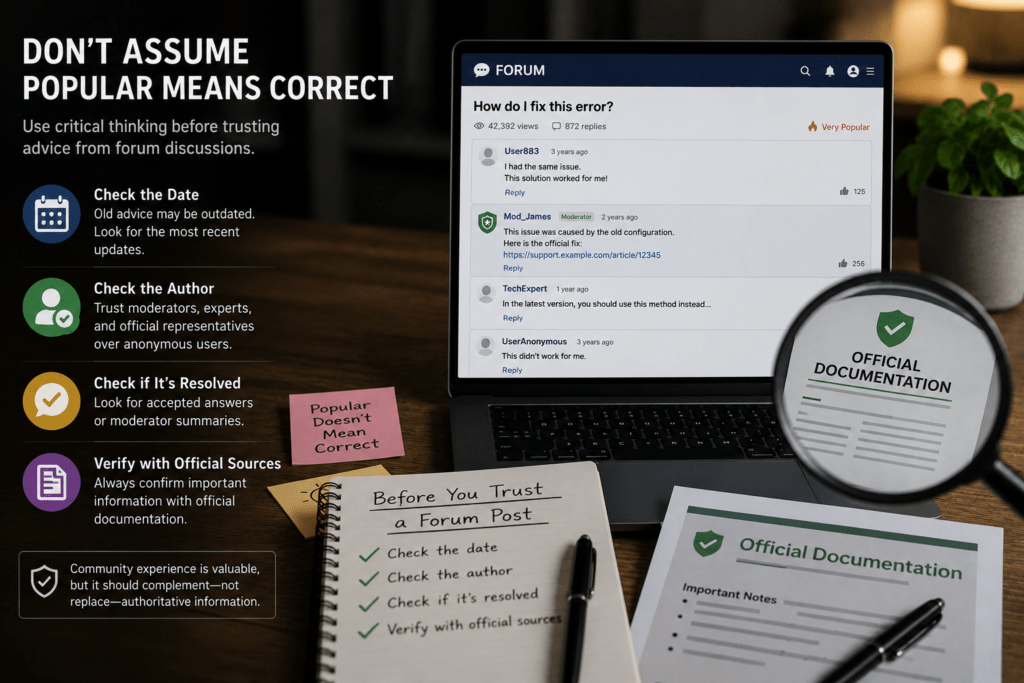
One of the most common mistakes on forums is assuming that a popular thread must contain the best information.
In reality, discussions often become popular because they are controversial, entertaining, or emotionally engaging. A heated debate may attract thousands of replies while never reaching a clear conclusion. Likewise, an outdated troubleshooting guide may continue receiving views simply because search engines have ranked it highly for years.
Before relying on advice from a popular discussion, consider several factors.
First, check when the thread was last updated. Software, products, and online services change frequently. Advice that solved a problem three years ago may no longer apply after major updates.
Second, identify who is providing the information. Replies from moderators, verified experts, experienced contributors, or official company representatives generally deserve more attention than unsupported opinions from anonymous users.
Third, determine whether the original question has already been resolved. Some forums allow accepted answers or moderator summaries, making it much easier to identify the final solution instead of reading hundreds of replies.
Finally, compare important claims with official documentation whenever possible. This is especially important for discussions involving financial products, medical advice, legal requirements, software configuration, or online security. Community experience can be valuable, but it should complement—not replace—authoritative information.
A Practical Workflow for Using Any Forum Efficiently
Whether you are joining a photography community, a programming forum, a gaming discussion board, or a consumer support community, the same workflow generally produces the best results.
Begin by checking whether there are any recent announcements. These may immediately explain temporary issues, recent rule changes, or scheduled maintenance that affects your question.
Next, spend a few minutes reading the pinned posts in the category where you plan to participate. This small investment often saves considerable time because many communities explain exactly how questions should be asked, what information should be included, and which topics belong in each section.
Only after understanding the community rules should you browse popular discussions. These threads help you understand what experienced members are currently talking about and may reveal solutions to problems that many users are facing. However, always remember that popularity reflects community engagement rather than verified accuracy.
If your question is very specific, use the forum’s search function before creating a new thread. Searching with product names, error messages, model numbers, or exact keywords often produces better results than browsing popular discussions alone. Many long-established forums contain years of archived knowledge that no longer appears on the front page but remains highly relevant.
If you still cannot find an answer, create a new discussion that follows the posting guidelines you have already read. Providing clear details, relevant screenshots where permitted, and a descriptive title increases the likelihood of receiving useful responses while reducing the chance that moderators will close the thread as a duplicate.
By following this workflow, you make better use of the community’s existing knowledge, respect forum etiquette, and significantly improve your chances of finding accurate, up-to-date information without unnecessary frustration.