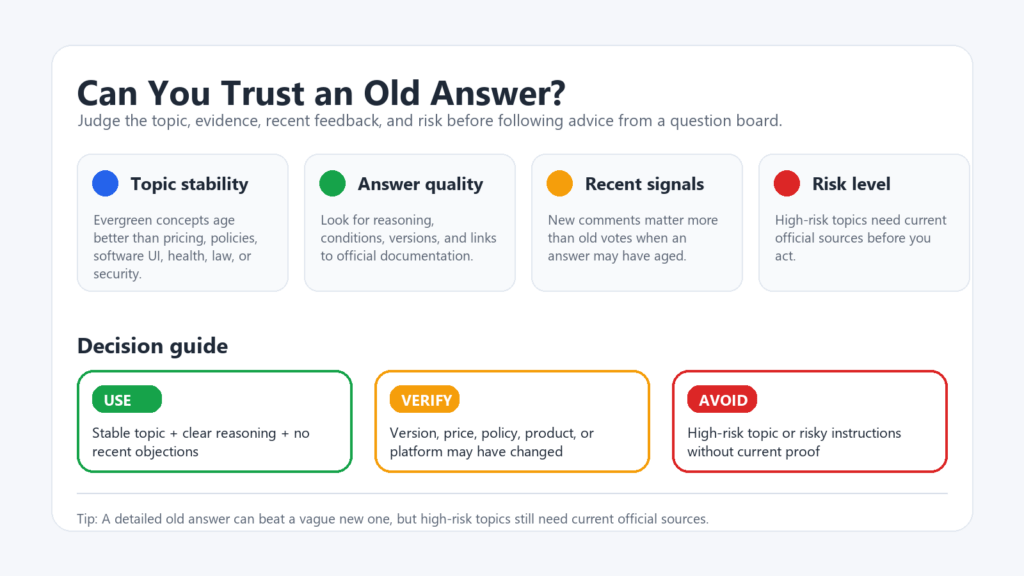
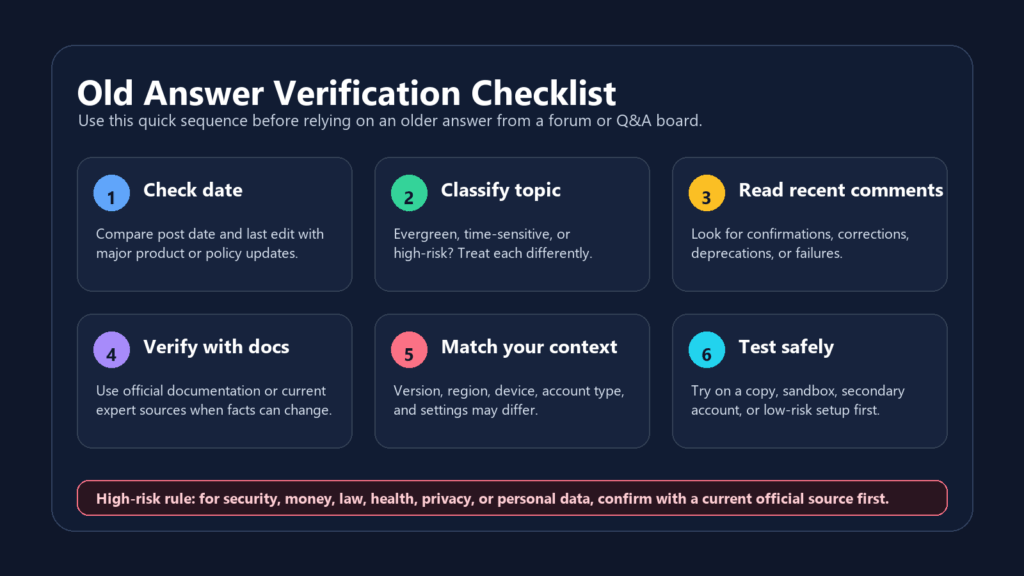
An answer does not become unreliable simply because several years have passed. Its real expiry date is the moment when something it depends on changes. A five-year-old explanation of a mathematical principle may still be correct. A two-month-old answer about an app menu may already be useless after an interface update. Instead of asking, “How old is this answer?”, ask:
What would need to change for this answer to stop being true – and has that change happened?
That question usually provides a better decision than the post date, accepted mark, or number of votes.
First identify what the answer depends on. Different types of information become outdated for different reasons.
The answer concerns
What could make it outdated
Where to verify it
A general principle or method
New evidence, a recognized correction, or a missing condition
A current textbook, primary reference, or authoritative explanation
Software instructions
A version update, removed feature, changed menu, or deprecated command
Current documentation and release notes
A price, plan, or product
A price change, new conditions, or discontinuation
The provider’s current product page
Korean law or public benefits
An amendment, new effective date, or changed eligibility rule
The current text in the National Law Information Center
Security advice
A new vulnerability, patch, or safer recommended method
The latest vendor notice or KISA/KrCERT advisory
This is why an arbitrary rule such as “only trust answers from the past year” is not very useful. A stable explanation may remain valid for a decade, while a current-looking answer may expire after the next software release.
For Korean legal information, the National Law Information Center provides separate access to current and historical laws. The current text tells you what applies now; the historical version only shows what applied when the old answer was written.
Check Whether the Answer Was Written for Your Exact Situation
An answer can remain technically correct but still be wrong for you. Compare its conditions with your own:
Software and operating-system version
Device or product model
Country and jurisdiction
Free, paid, business, or student account
Contract or subscription type
Date and location to which the rule applies
Suppose an old answer says, “Open Settings, select Privacy, and disable this option.” Before following it, confirm that the current version still contains the same setting and that the answer was written for your operating system. The same applies to advice such as “this refund is available,” “this plan includes the feature,” or “this document is not required.” The statement may have been correct for a particular country, account type, or application period without applying to everyone.
A useful answer normally explains its assumptions and limitations. Stack Overflow’s official guidance also encourages answerers to state relevant limitations, assumptions, and simplifications. When an old answer gives no version, environment, or conditions, treat it as incomplete rather than universally applicable.
Check What Changed After the Answer Was Posted
An old answer should be judged together with everything published after it. Later edits, recent comments, newer answers, or updated official documentation may show that the original method has changed or no longer works.
Votes and accepted-answer marks are useful signals, but they only show that the answer helped readers at some point. Stack Overflow notes that an accepted answer may remain selected even after a better solution appears. Naver Knowledge iN also uses user reactions and other service indicators to rank answers, but popularity does not confirm that the information is still current.
Give more weight to a recent, specific correction:
“This option was removed in version 6.0. The current procedure is documented here.”
Be more cautious with vague comments such as:
“Still works for me.”
The first identifies what changed and provides evidence. The second may refer to a different device, version, or account type. Also remember that several pages repeating the same answer may all come from one outdated source.
Match the Verification Effort to the Cost of Being Wrong
Not every old answer requires the same level of proof.
For a low-risk question, clear reasoning and a safe test may be sufficient. An old cooking technique, spreadsheet formula, or non-destructive command can often be checked without serious consequences.
For a product feature, price, application procedure, or subscription condition, verify the claim on the current provider page. Testing an outdated instruction may waste time or money, even if it causes no major harm.
For legal, financial, medical, privacy, and security questions, an old community answer should be treated only as a lead. Confirm the claim with a current primary or official source before acting.
Security advice deserves particular caution. A workaround that once fixed a login problem may now expose the account to a known vulnerability. Current KrCERT advisories identify affected products and versions as well as patched or recommended versions, illustrating why the latest security notice should override an old forum workaround.
The practical rule is simple:
The greater the damage a wrong answer could cause, the less weight you should give to age-independent signals such as votes, acceptance, or personal testimonials.
Decide Whether to Keep, Update, or Replace the Answer
After checking what the answer depends on and whether those conditions have changed, place it into one of the three categories below. This helps separate an answer that is still usable from one whose core idea survives but whose details need revision, and from one that should no longer be followed.
Decision
When it applies
What to do
Example
Keep the answer
The subject is stable, the reasoning is clear, the stated conditions still match your situation, and no current authoritative source contradicts it.
Use the answer while preserving any limitations or assumptions stated by the original writer.
An older explanation of a mathematical principle remains consistent with current textbooks and does not depend on a software version or policy.
Update before using
The core reasoning remains valid, but details such as menu paths, software versions, syntax, prices, deadlines, or eligibility conditions have changed.
Keep the useful principle, but replace outdated instructions and figures with current information from an official source.
An old programming answer explains the correct logic, but its syntax must be adapted to the current language or library version.
Replace the answer
A key dependency has changed, current official guidance gives a different answer, the referenced feature no longer exists, or the advice creates a new safety, legal, financial, or security risk.
Stop relying on the old answer and use a current primary source or a newer solution verified against official guidance.
An old troubleshooting answer recommends disabling a security feature that is now required to protect the account.
An old answer should not be trusted or rejected based only on its date, votes, or accepted status. The most reliable approach is to check what changed after publication and whether recent, specific evidence still supports the original method. When newer documentation or corrections conflict with the old answer, follow the current verified source.